文章摘要
这篇文章介绍了如何使用 NestJS 实现图形验证码和单点登录功能。文章从项目的结构开始,展示了如何通过 `@nestjs/cli` 创建项目并使用 `Nuxt` 命令行工具初始化项目结构。文章详细讲解了如何使用 `Nuxt` 的命令行创建模块,并通过装饰器实现 controllers 和 modules 的功能。
文章进一步介绍了如何使用 Mongoose 插件配置数据库操作,包括创建 schemas 和使用 `@Module` 实现模块化管理。此外,文章详细讲解了如何通过 `Express Session` 实现持久化会话功能,并提供了具体的示例代码。
在身份验证方面,文章介绍了如何使用 JWT 和 JwtService 生成和验证访问令牌,并通过 `CanActivate` 中 middleware 实现用户登录拦截功能。文章还提到了如何通过 guard 模块对未登录用户进行拦截。
总的来说,文章内容涵盖了从项目结构设计到具体实现的完整流程,提供了丰富的代码示例和实用技巧,对 NestJS 和 Mongoose 的使用有深刻的讲解。
目录实现图形校验和单点登录前置条件安装Moduleservice如何生成图形验证码如何使用 session接入 mongose
效果图
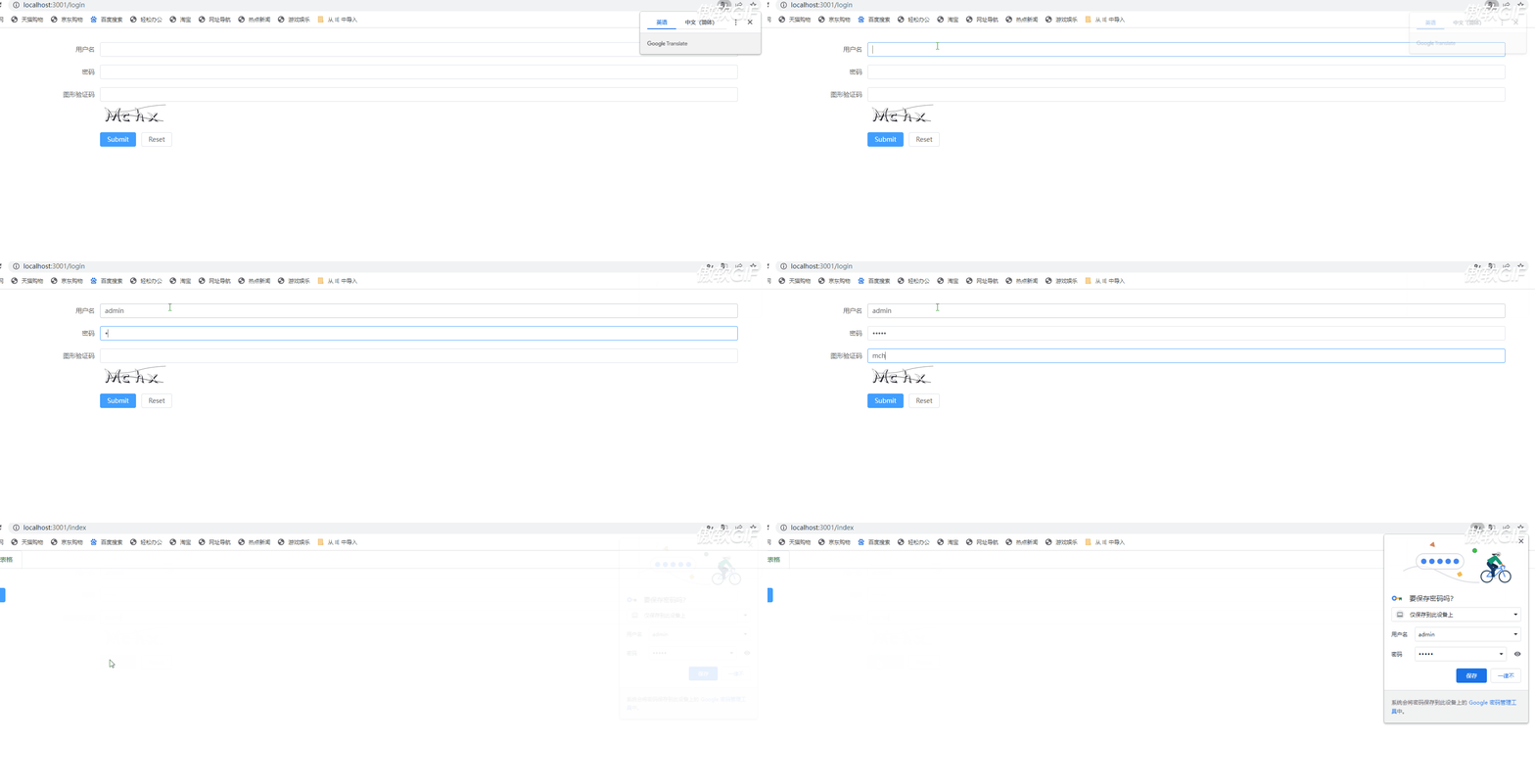
学习一下 nest
新建项目
npm i -g @nestjs/cli
nest new project-name
npm run start:dev //启动服务
目录结构

controllers
负责处理传入的请求并将响应返回给客户端。(定义路由等)
import { Controller, Get } from ‘@nestjs/common’;
@Controller()
export class AppController {
constructor() {}
@Get()
getHello(): string {
return ‘hello world’;
}
}
controllers 常用装饰器
常用装饰器
@Controller(path)@Get(path)@Post(path)@Request(), @Req()@Response(), @Res()@Session()@Param(key?: string)@Body(key?: string)@Query(key?: string)@Headers(name?: string)定义 root 路径定义 get 请求和路径定义 post 请求和路径请求体(req)响应体(res)session获取 req.params 参数获取 req.body 参数获取 req.query 参数获取 req.headers 参数@Global()
@Module({
providers: [MyService],
exports: [MyService],
})
export class AppModule {}
providers 属性用来声明模块所提供的依赖注入 (DI) 提供者,它们将在整个模块中共享。exports 属性用于导出模块中的提供者以供其他模块使用。global 标识符用于创建一个全局模块。在任何地方都可以使用 @Inject() 装饰器来注入其提供者。imports 选项用于引入其他模块中提供的依赖关系。
import { Injectable } from ‘@nestjs/common’;
@Injectable()
export class AppService {
getHello(): string {
return ‘Hello World!’;
}
}
业务逻辑具体实现
需要用到 svg-captcha 这个库
npm i svg-captcha
nest 命令行创建一个 captcha 模块nest g res captchanest 命令行:

import { Controller, Get, Response, Session } from ‘@nestjs/common’;
import * as svgCaptcha from ‘svg-captcha’;
@Controller(‘captcha’)
export class CaptchaController {
@Get()
async getCaptcha(@Response() res, @Session() session) {
const captcha=svgCaptcha.create({
size: 4,
noise: 2,
});
session.captcha=captcha.text;
res.type(‘svg’);
res.send(captcha.data);
}
}
通过 session 将当前会话的 captcha 存起来此时能通过:http://localhost:3000/captcha查看到效果图

npm i express-session
npm i -D @types/express-session
并且再 main.ts 中引入
import * as session from ‘express-session’;
// somewhere in your initialization file
app.use(
session({
secret: ‘my-secret’,
resave: false,
saveUninitialized: false,
}),
);
在本机下载 mogodb mogodb 官网下载
安装 mongoose
npm install –save mongoose
在 app.modele 中引入
import { Module } from ‘@nestjs/common’;
import { MongooseModule } from ‘@nestjs/mongoose’;
import { AppController } from ‘https://www.jb51.net/article/app.controller’;
import { AppService } from ‘https://www.jb51.net/article/app.service’;
@Module({
imports: [MongooseModule.forRoot(‘mongodb://127.0.0.1:27017/nest’)],
controllers: [AppController],
providers: [AppService],
})
export class AppModule {}
创建 schemas
import { Document } from ‘mongoose’;
import * as mongoose from ‘mongoose’;
export interface User {
account: string;
password: string;
}
export interface UserDoc extends User, Document {}
export const UserSchema=new mongoose.Schema({
password: { type: String, required: true },
account: {
type: String,
required: true,
unique: true,
},
});
export const UserModel=mongoose.model<UserDoc>(‘User’, UserSchema);
创建 auth 模块
nest g res auth
实现注册和登录方法controller
import {
Controller,
Get,
Body,
Post,
UseInterceptors,
Req,
Request,
Res,
} from ‘@nestjs/common’;
import { AuthService } from ‘https://www.jb51.net/article/auth.service’;
import { CreateUserDto } from ‘https://www.jb51.net/article/dto/index’;
import { ApiCreatedResponse } from ‘@nestjs/swagger’;
import { CaptchaMiddleware } from ‘src/middleware/captcha-middleware/captcha-middleware.middleware’;
@Controller(‘auth’)
export class AuthController {
constructor(private readonly authService: AuthService) {}
@ApiCreatedResponse({
description: ‘The record has been successfully created.’,
type: CreateUserDto,
})
@Post(‘register’)
async created(@Body() data: CreateUserDto) {
const user=await this.authService.created(data);
return user;
}
@UseInterceptors(CaptchaMiddleware)
@Post(‘login’)
async login(
@Body() data: CreateUserDto,
@Req() request: Request,
@Res() res,
) {
const user=await this.authService.login(data, request);
res.sendResponse(user);
}
}
引入uuid 生成随机数和userId做键值对映射,为单点登录打下基础。
引入jwt 生成token进行校验。
import { Injectable, UnauthorizedException } from ‘@nestjs/common’;
import { JwtService } from ‘@nestjs/jwt’;
import mongoose, { Model } from ‘mongoose’;
import { InjectModel } from ‘@nestjs/mongoose’;
import { UserDoc } from ‘https://www.jb51.net/schemas/user.schema’;
import { loginMapDoc } from ‘https://www.jb51.net/schemas/login.mapping’;
import { CreateUserDto } from ‘https://www.jb51.net/article/dto/index’;
import { v4 as uuid } from ‘uuid’;
@Injectable()
export class AuthService {
constructor(
private jwtService: JwtService,
@InjectModel(‘user’) private readonly userModel: Model<UserDoc>,
@InjectModel(‘loginmapModel’)
private readonly loginmapModel: Model<loginMapDoc>,
) {}
async created(data: CreateUserDto) {
const user=await new this.userModel(data);
return user.save();
}
async login(data: any, req) {
const { account, password, code }=data;
if (code.toLocaleLowerCase() !==req.session?.captcha.toLocaleLowerCase()) {
return {
code: 400,
message: ‘验证码错误’,
};
}
const user=await this.userModel.findOne({
account,
password,
});
if (!user) {
throw new UnauthorizedException();
}
const loginId=uuid();
const payload={
userId: user.id,
username: user.account,
loginId: loginId,
};
const token=this.jwtService.sign(payload);
const foundCollection=await mongoose.connection.collections[
‘loginmapModel’
];
if (!foundCollection) {
// 如果该 collection 不存在,则创建它
await new this.loginmapModel();
console.log(‘新建成功’);
}
await this.loginmapModel.findOneAndUpdate(
{ userId: user.id },
{ userId: user.id, loginId },
{ upsert: true, new: true, runValidators: true },
);
return { token, loginId };
}
async viladate(data: any) {
const { userId, loginId }=data;
const map=await this.loginmapModel.findOne({ userId, loginId });
return loginId==map.loginId;
}
}
最后创建一个guard,对用户是否登录进行拦截判断
nest g gu middleware/auth
import {
CanActivate,
ExecutionContext,
Injectable,
Request,
UnauthorizedException,
} from ‘@nestjs/common’;
import { Reflector } from ‘@nestjs/core’;
import { JwtService } from ‘@nestjs/jwt’;
import { jwtConstants } from ‘@/auth/constants’;
import { AuthService } from ‘@/auth/auth.service’;
@Injectable()
export class AuthGuardGuard implements CanActivate {
constructor(
private jwtService: JwtService,
private reflector: Reflector,
private authService: AuthService,
) {}
async canActivate(context: ExecutionContext): Promise<boolean> {
const skipAuth=this.reflector.get<boolean>(
‘skipAuth’,
context.getHandler(),
); // 返回 Boolean 值或 undefined,即是否跳过校验
if (skipAuth) {
return true;
}
const request: Request=context.switchToHttp().getRequest();
const token=this.extractTokenFromHeader(request);
if (!token) {
throw new UnauthorizedException();
}
try {
const payload=await this.jwtService.verifyAsync(token, {
secret: jwtConstants.secret,
});
const isRemoteLogin=await this.authService.viladate(payload);
console.log(isRemoteLogin, ‘payload’, payload);
if (!isRemoteLogin) {
throw new UnauthorizedException(‘异地登录’);
}
// We’re assigning the payload to the request object here
// so that we can access it in our route handlers
request[‘user’]=payload;
} catch {
throw new UnauthorizedException();
}
return true;
}
private extractTokenFromHeader(request: any): string | undefined {
const [type, token]=request.headers.authorization?.split(‘ ‘) [];
return type===’Bearer’ ? token : undefined;
}
}
到此这篇关于nestjs实现图形校验和单点登录的示例代码的文章就介绍到这了,更多相关nestjs 图形校验和单点登录内容请搜索脚本之家以前的文章或继续浏览下面的相关文章希望大家以后多多支持脚本之家!
您可能感兴趣的文章:NodeJS实现单点登录原理解析JavaScript实现单点登录的示例